
The Zanda Money-Back Guarantee gives you a full year to decide whether Zanda suits your practice. If it doesn’t meet your practice’s needs in that time, you can close your account and request a full refund of the subscription fees you’ve paid. Knowing whether a practice management system is the right fit can sometimes take a few months or more.
What the guarantee covers
The guarantee refunds 100% of the monthly Zanda subscription fees you’ve paid during the guarantee period.
Fees for optional add-ons and services are separate and aren’t refunded under the guarantee. These include:
- SMS messages and a dedicated SMS number (USA and Canada)
- Telehealth Pro
- AI Pro (BizzyAI: Scribe charged until October 13, 2026)
- Third-party integrations
You can change your plan size at any time during the guarantee period. Increasing or decreasing your plan doesn’t affect the guarantee, and you’re still covered for the subscription fees you’ve paid. Having the Zanda team import your data for you, through the free Data Import Service, doesn’t affect it either.
How long the guarantee lasts
The guarantee period starts on the date your free trial is activated and lasts one year. To be covered, request your refund within 364 days of the start of your free trial.
You can claim at any point in that period. There’s no need to wait until the end of the year before you close your account and request a refund.
How to request a refund
Closing your account and requesting a refund are two separate steps:
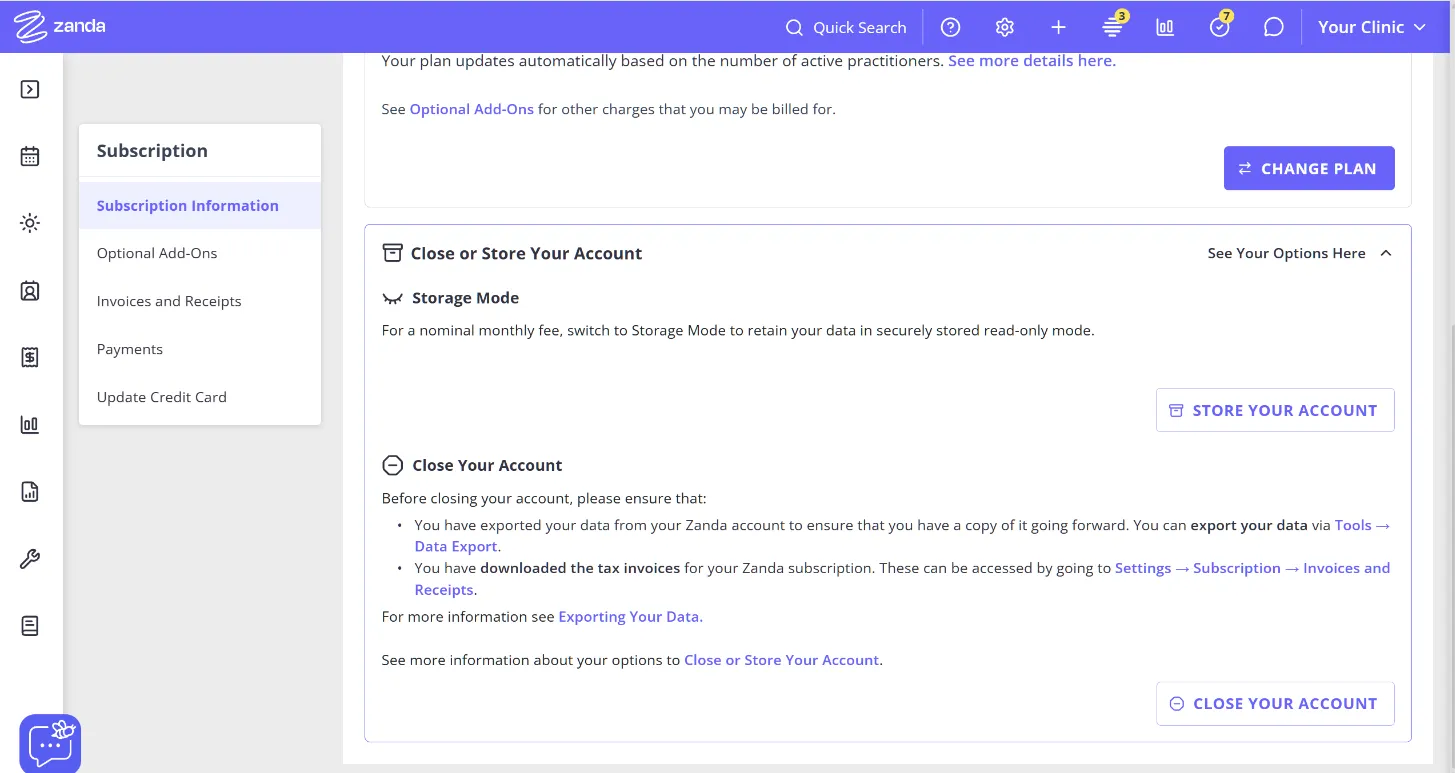
- Set your account closure date in the Close or Store Your Account section of the Subscription Information page. For the full steps, see How to Store or Close Your Account. If you’ve already set a closure date, the section reads Store Your Account instead, and you can go straight to the next step.
- Email the support team at [email protected] and let them know you’d like a refund under the Money-Back Guarantee. The team reviews your request alongside your account details.
In most cases, the refund is made by reversing your original payments to your card.
Tip: If you want to keep a copy of your records, export your data from Tools > Data Export before your closure date. Data export is free and available in every account.
Eligibility conditions
The guarantee is there for practices that find Zanda doesn’t meet their business needs. A few conditions apply, set out in full in the Zanda Terms of Use:
- The claim must be about Zanda not meeting your needs. A refund can’t be claimed because your business is closing.
- Subscription payments must stay up to date. If an automatic payment during the guarantee period is declined, for example because of insufficient funds or an expired card, and the invoice stays unpaid for more than 7 days, the account is no longer eligible.
- Returning customers who have already claimed aren’t covered again. If you’ve claimed a refund under the guarantee before and then open a new account, the new account isn’t eligible.
- Some government, university, and corporate accounts may be excluded. Accounts of this kind that need extensive setup help from the support team may not be offered the guarantee. If this applies to your account, you’re told in advance.
- Events beyond Zanda control and breaches of the Terms of Use are excluded. The guarantee doesn’t apply to situations caused by large-scale events such as wars, pandemics, economic recessions, or natural disasters, or where the Terms of Use have been breached.
Frequently Asked Questions
Is the Money-Back Guarantee the same as a refund for a technical issue?
The guarantee is about whether Zanda is the right fit for your practice, and it refunds your subscription fees during your first year. It’s separate from compensation for a bug or service disruption, which Zanda doesn’t offer. For the reasons behind that approach, see Our Approach to Refunds and Compensation.
Is there a lock-in contract or a cancellation fee?
Zanda plans are paid monthly, as you go, with no lock-in contract, minimum period, or cancellation fee. You can close your account at any time, whether or not you’re claiming under the guarantee.