
Accessing Your Zanda Payment Receipts
Note: A master user/account owner and a user with “Setup and Configure Zanda” and “Access Financial Reports” can access Subscription (click your practice name, top right) and Account Settings > Practice > Subscription page.
- Click your practice name (top right) > Subscription (or Account Settings > Practice > Subscription). This opens your Subscription page.
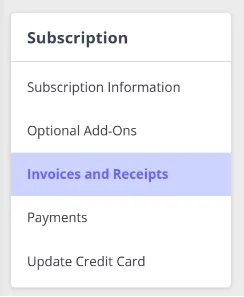
- Along the top of the Subscription page you’ll see a row of tabs: Subscription Information, Optional Add-Ons, Invoices and Receipts, Payments, and Update Credit Card. Click the Invoices and Receipts tab. Your invoices live on this tab, not further down the Subscription Information page.
- Click the gear icon to the right of the invoice you want and click Print
Note: If you have an unpaid invoice, the tab opens showing only your unpaid invoices. Select Show all Invoices above the list to see your full invoice history, newest first.
Despite its name, Print doesn’t need a printer. It downloads a PDF copy of your invoice or tax invoice straight to your computer, tablet, or phone, so you can save it for your records or print a hard copy later if you want one.
Frequently Asked Questions
Can I get my subscription receipt emailed to me?
We don’t send subscription receipts by email automatically. They’re always available to download from the Invoices and Receipts tab on your Subscription page accessible via Subscription > Invoices and Receipts (click your practice name, top right). If you can no longer access your account (for example, you’ve closed it) and you need a copy for your records, contact our support team and we’ll help.
Can I download all my subscription invoices at once?
No. There isn’t an option to download all your subscription invoices in a single file. Each invoice downloads separately: on the Invoices and Receipts tab, select Show all Invoices, then click the gear icon next to each invoice and click Print to save its PDF. Your subscription invoices aren’t included in the data export either, as that covers your practice and client data, such as the invoices you issue to your clients. To keep your records up to date without a large backlog at tax time, we recommend downloading each subscription invoice when it’s issued.