
We’re introducing new AI plans for Zanda, launching on 13 October. These give more customers access to built-in AI tools at no extra cost, while offering higher usage limits and broader client context for those who use AI more frequently.
Our free tier, AI Core will be included with every Zanda subscription and will introduce more AI functionality at no extra cost. For those who use AI more frequently, AI Pro will be available as a paid per-user monthly add-on with unlimited Scribe and broader Client Insights.
For group practices, you’ll be able to choose the plan for each user, giving AI Pro to those who need higher usage and keeping everyone else on AI Core.
What’s included in AI Core and AI Pro?
| Feature | AI Core | AI Pro |
|---|---|---|
| AI writing and editing (letters, emails, templates, practice manual) | Included | Unlimited |
| AI appointment summaries | Included | Unlimited |
| AI Scribe | 4 notes per month | Unlimited notes |
| AI Insights | Access each client’s last 3 sessions | Full client history |
| AI Write with Insights | Uses context of last 3 sessions | Full client history |
| Smart AI SMS interpretations (coming soon) | Included | Unlimited |
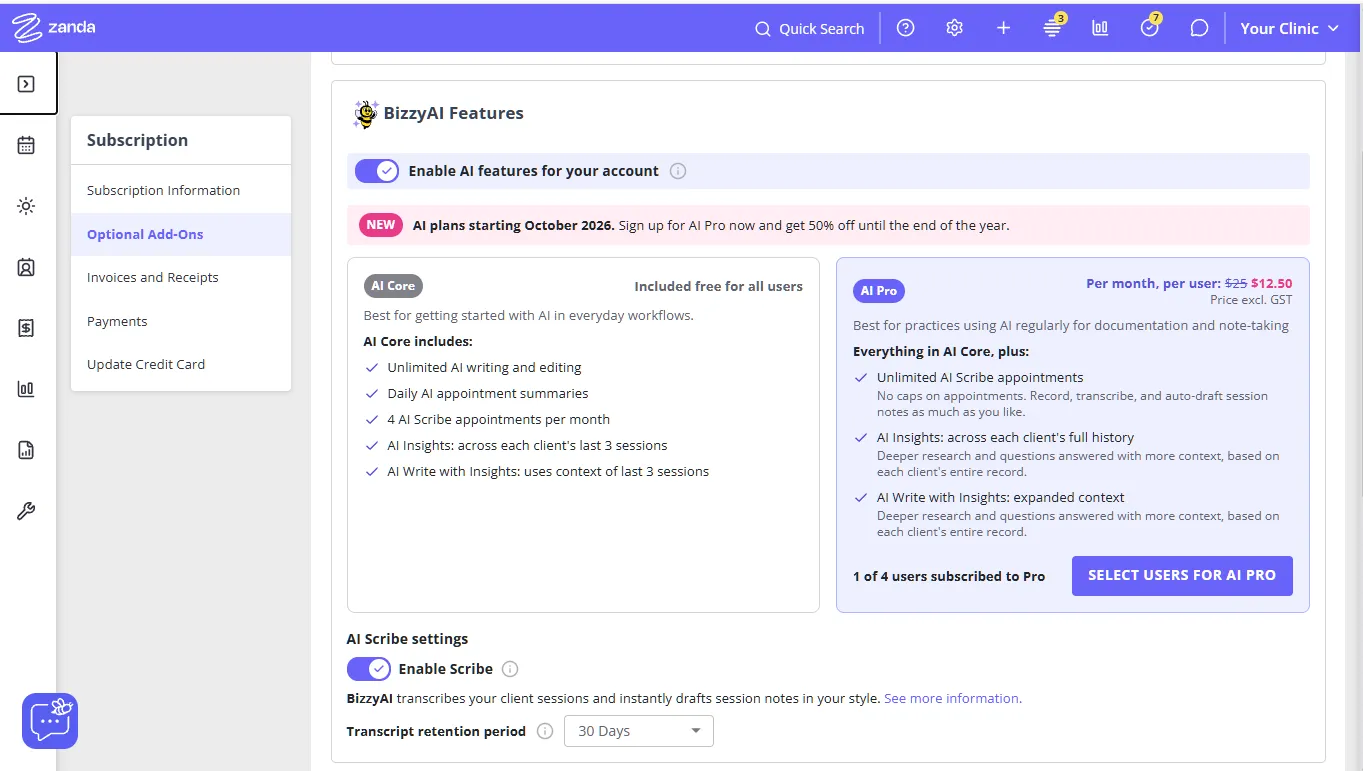
AI Core will be included with every Zanda subscription at no additional cost. AI Pro will be an optional per-user add-on that includes everything in AI Core, plus unlimited AI Scribe and expanded AI Insights.
AI Core: Built-in AI for everyday practice work
AI Core gives Zanda users access to AI tools that can help with everyday documentation, writing, and client context.
With AI Core, you can:
- Refine manually written notes or notes created with AI Scribe
- Create letters and emails or Practice Manual content with AI Write
- Use Client Insights to work with a client’s 3 most recent sessions
- Use AI Write with that same recent Client Insights context to produce letters or emails
- Access AI appointment summaries, so you can see where you left off with each client before the session
- Use up to four AI Scribe sessions per billing cycle
Client Insights on AI Core only looks at a client’s 3 most recent records, covering sessions, notes, forms, communications, invoices, referrals, tasks, and diagnoses. It can’t search further back into their history, and it doesn’t support a specific date range. For anything beyond the 3 most recent sessions, you’ll need AI Pro.
The AI Features setting in Optional Add-Ons must be enabled for your practice to use any AI functionality.
What AI appointment summaries are
AI appointment summaries give you a short recap of where you left off with a client, so you can prepare for a session without opening the full note.
They are per appointment, not a single overview of everything booked that day. Open an appointment from your appointment list in Daily Focus, and the summary appears on the right under Previous appointment with you, labeled Note Summary. It summarizes the clinical note you wrote at your most recent previous appointment with that client. Select View Note to open the full note.
For a summary to appear, all of the following need to be true:
- AI Features is enabled for your practice in Account Settings > Subscription > Optional Add-Ons.
- You have seen the client before. On a first appointment, Zanda shows “This is your first appointment with this client” instead.
- A clinical note you wrote is linked to that previous appointment. If nothing is linked, Zanda shows “No clinical note linked to this appointment”. Notes written by another practitioner are not summarized, so you only ever see a recap of your own note.
The summary sits right there in Daily Focus when you open the appointment, so you can prepare for the session without breaking away to search for the client’s last note. That saves you time before the session and keeps your attention on the client instead of on searching through records. See Use Daily Focus for Appointments, Tasks, and Client Context to learn about everything else Daily Focus shows.
AI Pro: For professionals who use AI more frequently
AI Pro includes everything available in AI Core, with higher usage and broader client context.
With AI Pro, you can:
- Use AI Scribe without a session limit
- Search a client’s entire history, not just their most recent sessions
- Ask Client Insights about something further back in a client’s history, not only what’s recent
- Use this expanded client history when creating content with AI Write with Client Insights to write contextually aware letters and emails
Unlike AI Core, AI Pro isn’t limited to a client’s 3 most recent sessions: it can search their full history, across notes, forms, communications and more, to find the information you need. AI Pro is available per user, so multi-user practices can choose which team members need Pro without upgrading everyone in the practice.
How the four included Scribe sessions are counted
AI Core includes up to four Scribe sessions per billing cycle. See BizzyAI: Scribe & BizzyAI: Refine for Notes for the full setup guide, or How to Try BizzyAI: Scribe with Confidence if you’re just getting started.
The allowance is counted per note, not per individual recording.
For example, if you make multiple recordings or transcriptions within the same note, only the first transcription attached to that note counts as a session toward your allowance.
Short transcriptions, such as those used for a test recording, don’t count toward your allowance either.
Your Scribe usage is also separate from your transcription retention settings. If a transcription is deleted after it has been used, the transcribed note will still count toward the allowance for that billing cycle.
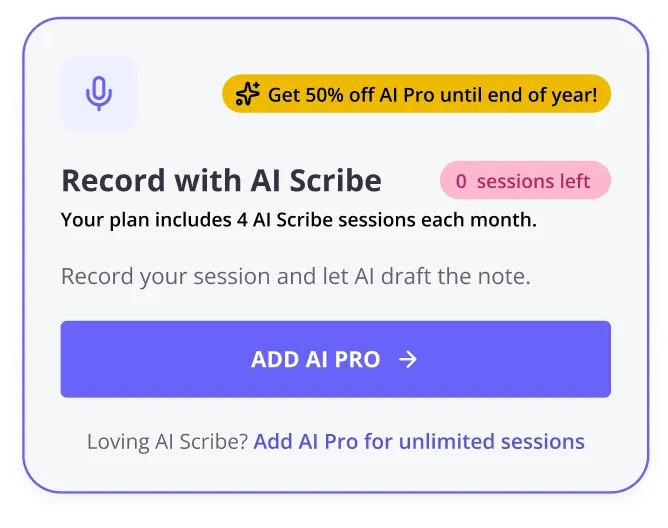
You’ll be able to see how many included Scribe sessions you have used and how many remain before starting a new one. On the client Notes page, before you start recording, a message shows how many of your four included sessions you’ve used this billing cycle; once you’ve used all four, the same message lets you know you’ve reached the limit. This message doesn’t appear on a free trial, or for a user who already has AI Pro.
Once all four included sessions have been used, you can wait until your next billing cycle or upgrade the user to AI Pro for unlimited Scribe.
How Client Insights differs between AI Core and AI Pro
With AI Core, Client Insights will reference only the client’s 3 most recent records, across notes, forms, communications and more. It won’t be able to return information about records beyond these three most recent records.
With AI Pro, Client Insights can search a client’s entire history to find the relevant information, not just their most recent sessions.
This makes AI Core useful for understanding recent client context, while AI Pro is designed for situations where you need to examine a longer history. See BizzyAI: Insights for Client-Aware Letters, Emails & Q&A for the full guide.
Using AI Note Refine
AI Note Refine is included in both AI Core and AI Pro.
When you refine a note containing an AI Scribe transcription, Refine can use the transcription and allows you to provide custom AI instructions and additional context.
When you are writing or updating a manually written note without an AI Scribe transcription, Refine works with the note content or the information you provide to Refine. Custom AI instructions and additional client context are not available in this workflow.
See BizzyAI: Scribe & BizzyAI: Refine for Notes for the full guide to both features.
What happens if you already pay for BizzyAI Scribe?
The paid BizzyAI Scribe add-on is changing as we introduce AI Core and AI Pro.
When the new plans launch on 13 October, AI Core will include up to four Scribe sessions per billing cycle at no extra charge. For unlimited Scribe sessions, you will need to subscribe to AI Pro.
If you regularly use more than four Scribe sessions and want to continue using Scribe without limits, you can subscribe to AI Pro before the change takes effect. Go to Account Settings > Practice > AI Settings page to review and manage your AI plan.
If four included Scribe sessions per billing cycle meet your needs, you don’t need to subscribe to AI Pro. You’ll continue with AI Core as part of your Zanda subscription without needing to take any action.
Managing AI Pro access
AI Pro is a monthly per-user add-on.
A group practice can add AI Pro for practitioners who regularly use Scribe or need broader Client Insights, while other users can continue with AI Core included in the Zanda subscription.
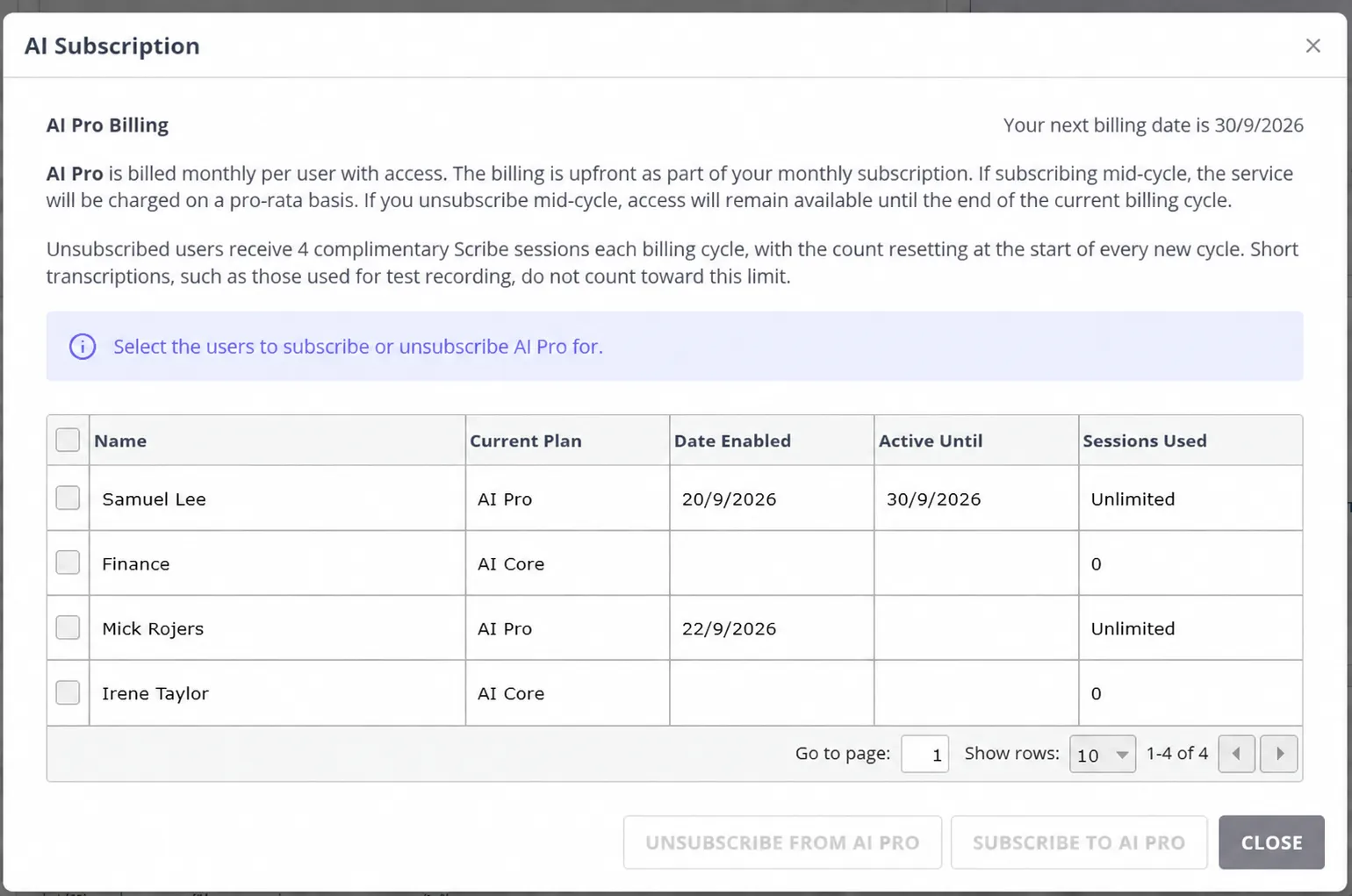
You can review which users have AI Pro and manage their access from Account Settings > Practice > AI Settings.
What do I need to do?
AI Core is included with your Zanda subscription, provided AI Features are enabled for your practice. Check your AI settings in Account Settings > Practice > AI Settings.
If you currently pay for BizzyAI Scribe and use it for more than 4 sessions per billing cycle, or if you’d like to ensure you gain access to AI Pro once it’s released, you’ll need to subscribe to AI Pro to maintain unlimited Scribe usage. This can be done in Account Settings > Practice > AI Settings.
If you’d like to remain on AI Core, you don’t need to do anything. You’ll be automatically placed on the AI Core plan when these new plans come into place.
If some members of your team need unlimited Scribe or broader client context, you can add AI Pro for those users individually.
Frequently Asked Questions
How much does AI Pro cost?
| Region | Price per user / month |
|---|---|
| US | $19 |
| Australia | A$25 + GST |
| New Zealand | NZ$25 |
| UK | £19 |
| EU | €19 |
| Canada | CA$19 |
| South Africa | R350 |
When will I be charged for AI Pro?
Enabling AI Pro for a user takes effect immediately, but you’re not charged right away. AI Pro is billed as part of your practice’s normal billing cycle: if you add it partway through a cycle, that first charge is pro-rated for the number of days remaining in the cycle. From your next billing cycle onward, it’s billed at the full monthly rate shown above.
If I subscribe to AI Pro before the new plans launch, when does billing start?
AI Pro’s unlimited Scribe and full client history become available when the new plans go live on 13 October. Subscribing before then sets those users up in advance, so they have AI Pro from the day it goes live. Billing for AI Pro does not commence until the new plans are officially released: nothing is charged at the moment you subscribe, and AI Pro first appears on your regular Zanda subscription invoice after launch, following the same pro-rated billing described above.
Subscribing early doesn’t commit you to a minimum term. You can unsubscribe a user at any time, including before the plans go live, and there’s no cancellation fee.
I don’t see the new AI Core or AI Pro features yet. Is something wrong?
No. The new plans aren’t live until 13 October, and nothing in your account changes before then. Until launch, you can keep using the AI tools you already have, such as AI Scribe, AI Refine for notes, and AI Write for letters and emails, as long as AI Features is enabled in Account Settings > Subscription > Optional Add-Ons.
When the plans go live, AI Core is added to your Zanda subscription automatically, so you don’t need to do anything. If you’ve already subscribed users to AI Pro, they move onto AI Pro from launch day.
If it’s after 13 October and you still don’t see the new features, contact [email protected] so we can check your account. If it’s the BizzyAI: Insights button you’re missing, see BizzyAI: Insights for Client-Aware Letters, Emails & Q&A.
Can I unsubscribe while I’m on the introductory AI Pro price?
Yes. The introductory price is a discount applied to the AI Pro rate for a set period. It doesn’t create a fixed term or a commitment to stay subscribed, and you can unsubscribe a user at any point, whether the discount is still running or has ended, on the same terms as disabling AI Pro described below. When the discount period ends, AI Pro continues at the standard per-user rate shown above for anyone still subscribed.
What happens if I disable AI Pro?
Disabling AI Pro for a user doesn’t end their access straight away. They keep AI Pro, including unlimited Scribe and broader Client Insights, through the end of the current billing cycle, and there’s no further AI Pro charge for that user after this cycle. From the start of the next billing cycle, they automatically move back to AI Core, with its four-session Scribe allowance.
Can I add AI Pro for only some users in my practice?
Yes. AI Pro is a per-user add-on, so group practices can choose which users need AI Pro. Other users can continue with AI Core included in the Zanda subscription.
When do my four included Scribe sessions reset?
The four Scribe sessions included with AI Core reset each billing cycle.
What counts as one Scribe session?
Scribe usage is counted per note, not per recording. A single note can contain multiple recordings or transcriptions, but will still only count as one session toward your allowance. Short transcriptions, such as those used for a test recording, don’t count toward the allowance.
Will deleting a transcription restore one of my included Scribe uses?
No. Scribe usage is not impacted by transcript retention. A transcribed note continues to count toward your allowance for that billing cycle even if the transcription is later deleted.
Do I need AI Pro to use AI Note Refine?
No. AI Note Refine is included with both AI Core and AI Pro.
Can I turn off the AI Core and AI Pro messages I keep seeing?
What you’re seeing comes from one of two different sources, and each behaves differently.
If it’s an announcement about the AI plan change, it runs for a set period and stops appearing on its own once that period ends. There’s no option in your account to hide it early.
If it’s the message on the client Notes page, that’s the AI Core Scribe usage notice covered under How the four included Scribe sessions are counted. It only appears for users on AI Core, not on a free trial, and it stops appearing once a user moves to AI Pro.
If one of these messages is getting in the way of your work, email [email protected] and let the team know which screen you’re seeing it on.
What happens to my current paid BizzyAI Scribe subscription?
You will be placed on AI Core when the new plans launch. AI Core will include four Scribe sessions per billing cycle. If you want unlimited Scribe, you can subscribe to AI Pro before the new plans take effect. If four included sessions meet your needs, no Pro subscription is required. If you decide AI Pro is right for you, you can enable it from Account Settings > Practice > AI Settings.