
- Before you can process a health point (health fund) claim via Tyro Health, ensure that you have read through our article on Getting Started with Tyro and configured your account to use Tyro Health, including the Merchant ID setup.
- If you are an existing Tyro user but do not have access to Tyro HealthPoint yet, please contact the Tyro Health Support Team to complete the application for Tyro HealthPoint to be enabled on your terminal.
To help with getting things ready to go, read through each of the articles below and add anything as needed:
- Adding relevant Services and item codes to Zanda
- Adding Provider Numbers:
-
Navigate to Tools > Health Point > Providers
-
Click on +Add Provider
-
Fill out the Provider Number
-
Select Service Type and Practitioner
-
Save
Hint 💡 You can find which item codes to use for your profession on Tyro’s website here.
Once all of the above is set up and running, you can begin processing health fund claims via Tyro Health.
Processing a HealthPoint Claim from the Appointment Panel
-
Select the appointment in the calendar.
-
On the appointment panel to the right, add a payment and select Tyro as the method.
-
From the Tyro Options menu, select Health Point
-
Click Create Health Point Claim
Note _: if you would first like to run a rebate estimate, click “Tyro Rebate Estimate” to do so before continuing.
_ -
Ensure the patient ID from the client’s card is entered, and ensure that the Service Type, Provider Number and other relevant information is correct, then click Save.
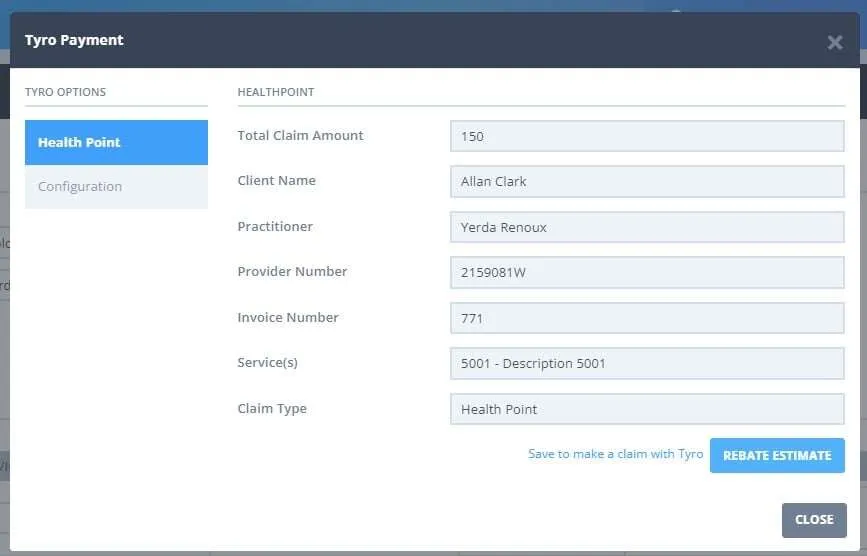
-
Click Submit Claim.
-
Follow the prompts on the terminal and swipe cards as needed.
-
Review the response and click Accept to save the claim.
-
If necessary, it is possible to cancel the health point claim on the same day
If a gap payment is required then you will be prompted to process this during the above process.
Frequently Asked Questions
Can I process a healthpoint claim without the physical card?
No. Patients/clients must have their health care card physically present with them at the terminal in order to process the claim.
Can I transfer a HealthPoint claim or claim payment to another client?
No. Once a HealthPoint claim or claim payment has been processed through Tyro Health, it cannot be transferred from one client profile to another in Zanda.
HealthPoint claims are linked to the client and payment details used at the time the claim is processed. This means the claim or payment must remain recorded against the original client profile.
If a claim or payment was processed under the wrong client, you may need to review the transaction and process the correct claim or payment under the correct client profile. If you are unsure what action to take, please contact Zanda Support or Tyro Health for guidance before making changes.
Note: When submitting a HealthPoint claim in Zanda, all service items on the invoice are transmitted as part of the claim. Currently there isn’t an option to select individual line items (such as ticking specific services) to include or exclude from the HealthPoint submission. If your Invoice needs to be claimed, the steps are:
- Add the claimable item(s) to the invoice first.
- Process the HealthPoint claim for those items.
- Once the claim has been processed, add the remaining non-claimable items
- Process payment for those items separately.
Tyro Support Details
🛠️ Tyro Health Customer Support(response time is under 5 min)
- Call 1300 018 976, then press Option 1 → Option 5
☑️ For help with technical issues, connection problems, terminal setup, and claims.
📞 Tyro Health Sales
- Call 1300 018 976, then press Option 2
☑️ For new merchant signups, additional terminals, or multi-merchant setup.
💡 Tip: Calling the correct option helps you reach the right team faster!
Useful Links
Tyro Terminal:
- Network test and IP Address for whitelisting - https://www.tyro.com/selftest/
- Terminal Configuration Page (plus submitting logs to Tyro) -
https://iclient.tyro.com/configuration.html - Tyro Service Status (inc. Easyclaim) - https://status.tyro.com/
- Tyro Health Service Status page - <https://status.tyrohealth.com/ >
Tyro HealthPoint funds and supported professions
- Complete list of supported funds and professions for the Tyro Terminal and Tyro Health Online
- Health Funds Not Supported by Tyro HealthPoint:
- MDHA
- GU Health (under migration to nib)
- CDH