
-
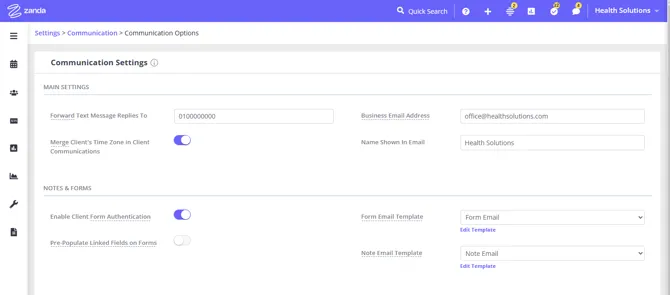
Forward Text Message Replies To: When clients reply to an SMS sent from Zanda, their reply will appear in the Messaging Panel for your practice to manage. Optionally, you can also enter a mobile number here to have those replies forwarded by SMS to that number. For appointment reminder replies forwarding, configure this per practitioner under User Menu > Account Settings > Team > Practitioners > [Practitioner] > Settings.
-
Business Email Address: This email address will be applied in the Email From Address field by default when sending an email from Client Profile > Communication > New Email without a communication email template. When a client replies to this email, the reply will be sent to this email address. You may opt to forward non-standard client replies to SMS appointment reminders to this email address. Go to User Menu > Account Settings > Team > Practitioner > Settings to configure this setting.
-
Name Shown In Email: This Name will be applied in the Email From Name field by default when sending an email from Client Profile > Communication > New Email without a communication email template.
- Note: Business Email Address and Name Shown In Email apply only when sending a one-off email from Client Profile > Communication > New Email without selecting a communication template. They do not affect the From Name or From Address on your saved communication templates — those are configured within each template individually at Tools > Communication > Templates.
-
Merge Client’s Time Zone in Client Communications: this will help to automatically convert appointment times in communication messages sent to your interstate clients who live in different time zones.
-
Enable Date of Birth for Form Authentication: lets clients verify their identity with their date of birth when they open a form that requires authentication. When enabled, a client who has a date of birth on their profile is asked to confirm it; a client without one authenticates by email or mobile number as before. Make sure every client who is sent a form that requires authentication has at least one of these three details saved on their profile: a client with none of them has nothing for Zanda to check against and stays on the authentication screen. Read here to learn more.
-
Form Email Template: select an email template to be used as a default when emailing a client’s form as an attachment from Client Profile > Records > Forms or Client Profile > Admin > Admin Forms.
-
Note Email Template: select an email template to be used as a default when emailing a client’s note as an attachment from Client Profile > Records > Notes or Client Profile > Admin > Admin Notes.
Password protection for PDF attachments
Zanda can require a password before a client’s PDF attachment can be opened, so a document that reaches the wrong inbox still can’t be read. This feature is currently in beta; practices can request access by registering interest through Help Menu > Beta Program. Turn protection on separately for Letters, Notes, Forms, and Invoices and Statements under Enable Password Protection for PDFs, in this same Communication Options page. The password is always the client’s date of birth, not one you or the client set. See PDF Password Protection for Email Attachments for how to turn it on, how the password works, and what happens if a client’s date of birth is missing.
-
Standard SMS charges will apply for the forwarded messages. A dedicated Toll-Free Number (TFN) is required to send/receive SMS messag
-
Barbados. For more details, please click here.
Click on the below links to learn more about