
The following steps detail how to add a Location-type merge field to an appointment reminder template.
- Navigate to User Profile > Account Settings > Practice > Locations and make sure that your Location Names provide clear information. Create and name a Telehealth location if necessary.
- At Tools > Communication > Templates open the appointment reminder templates (SMS or Email) that you use.
- Click on the Available Merge Fields link at the bottom of the template, and copy the {AppointmentLocationName} merge field. You can use other Location-specific merge fields like {AppointmentLocationNotes} to provide more instructions to the clients.
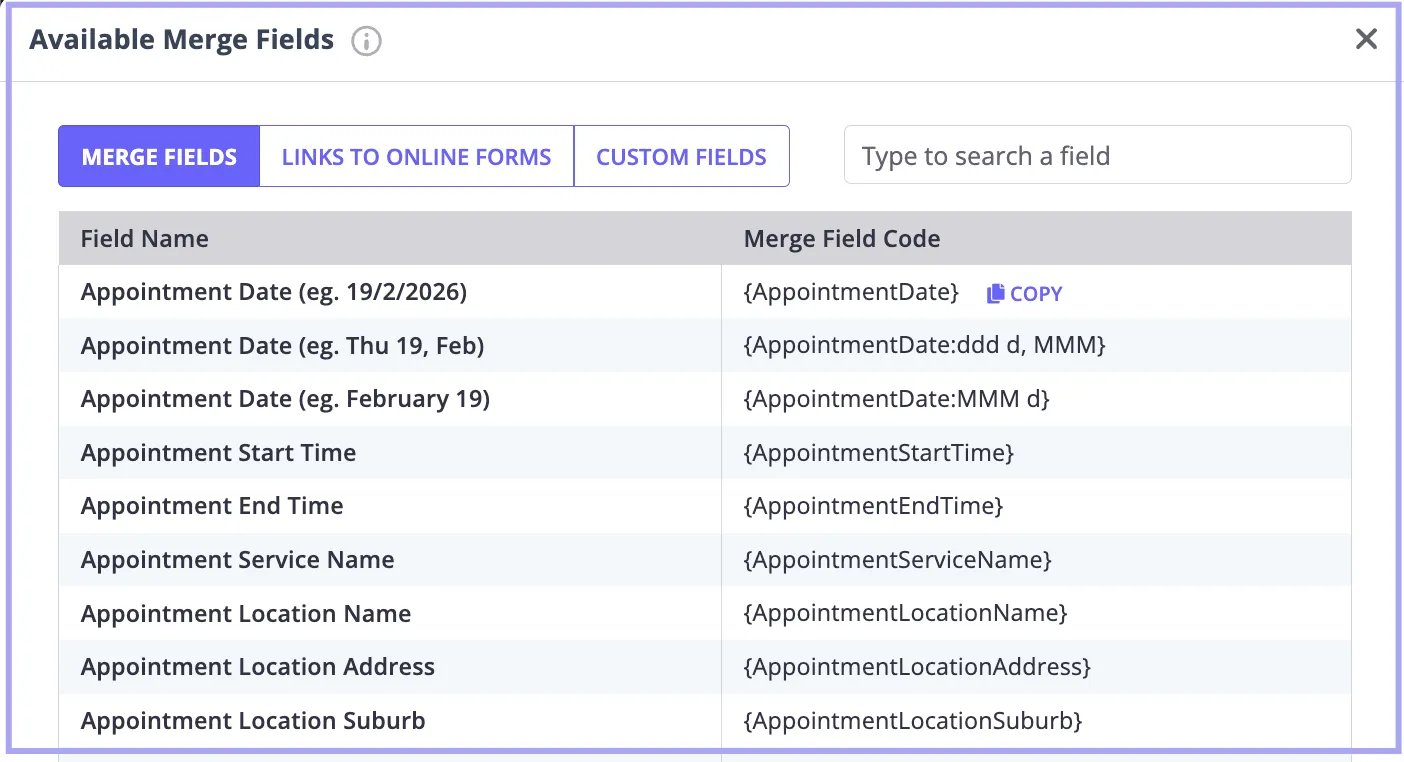
- Paste the merge field(s) into the body of the template.
- Click Save Changes.
Formatting Location Notes in reminders
The Location Notes field you set up in User Profile > Account Settings > Practice > Locations is a plain text box, not a formatting editor. When you add the {AppointmentLocationNotes} merge field to a template, Zanda copies your notes into the message exactly as you typed them. How that text looks depends on the message type:
- Email templates: Zanda applies basic HTML in your Location Notes when it sends the email. For example,
<b>Park at the rear</b>shows as bold text, and<a href="https://example.com">map</a>shows as a link. Line breaks you type with the Enter key don’t carry over into emails, so add<br>wherever you want a new line. - SMS templates: Because SMS messages are plain text, Zanda removes any HTML tags and sends only the text between them. For example,
<b>Park at the rear</b>arrives as “Park at the rear”.
Keep the following in mind:
- The Location Notes field holds up to 512 characters, and any HTML tags count towards that limit.
- Every template that includes the merge field uses the same Location Notes, so keep any HTML simple so the text still reads well in SMS.
- Send a test reminder to yourself to check how your notes look before clients receive them.
Please note: It is not possible to assign different reminder templates to separate locations. Instead, there are two ways to manage reminders across appointment types (in person and telehealth):
-
Single Template Approach – Include all appointment-related merge fields in one reminder template (for example, including the
ClientTelehealthUrlfield). You can add a note instructing clients to use the Telehealth link only if their appointment is Telehealth. -
Automation Approach – Exclude the Telehealth URL from your main reminder template and use a Pre-Appointment automation to send the Telehealth link only to clients who are booked at your Telehealth location.
❗ Please note that when the
ClientTelehealthUrlmerge field is included in any communication template, it will automatically populate with the unique Telehealth link for each client, regardless of appointment location.