
Turning Appointment Reminders On or Off for an Individual Client
- Access the client’s record (use the main search function).
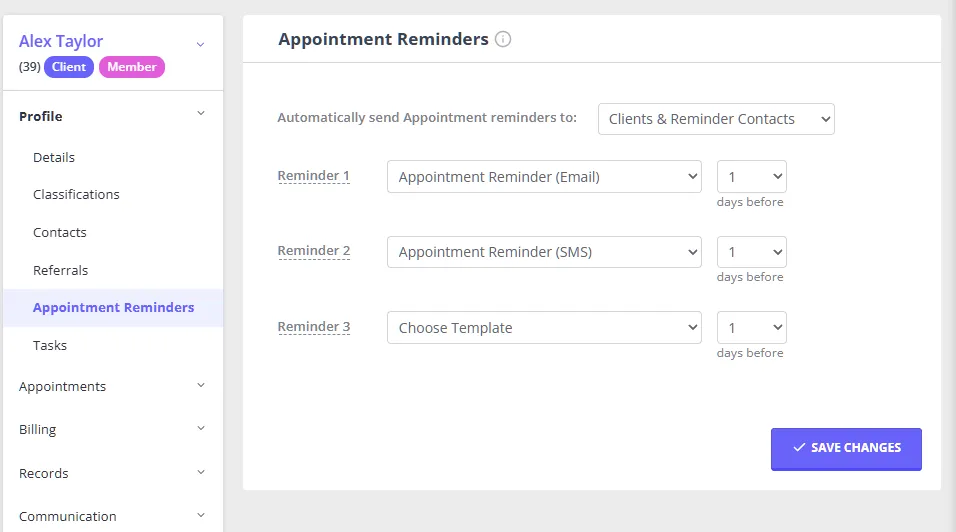
- On the sub-menu to the left go to Profile > Appointment Reminders.
- Choose Clients & Reminder Contacts (default), Reminder Contacts Only, or Off from the Automatically send Appointment reminders to: dropdown, as required.
- Click Save.
What this setting covers. This setting covers the automatic reminders sent in the days before an appointment, and on some accounts also determines whether reminders can be sent manually for this client. If it’s set to Off and you try to send a reminder manually (from the appointment context menu or the Notify Now bell), you’ll see “Appointment reminders are turned off for this client.” See Sending Appointment Reminders Manually. This setting does not stop the confirmation message sent when a new appointment is created, which is an account-wide setting. See Configuring Appointment Reminders.
Why choose Reminder Contacts Only? It is useful for a client, such as a child, who cannot receive their own reminders directly. Neither this option nor Off applies to shared profiles, which have their own separate reminder controls. See Configuring Appointment Reminders for the full breakdown of all three options and what happens if no reminder contacts are set.
Changing the Appointment Reminder Timing or Template for an Individual Client
- Follow Steps 1 and 2 as above.
- Alter the template and number of sending days prior to the appointment as desired.
- Click Save.