
💡 Note: Modifiers in Zanda are primarily designed for US insurance claiming workflows (including CMS-1500 forms).
What are Modifiers?
Modifiers are alphanumeric codes (up to 2 characters each) that you can attach to individual items on an Invoice or Item. They help clarify the context of the service or product provided to payers.
In Zanda, you can add up to four (4) distinct modifiers per service or product item.
Adding Modifiers to Services and Products (Setup)
You can configure default modifiers for specific services or products so they automatically appear whenever you invoice that item.
- Go to User Menu > Account Settings > Billing.
- Click on a Service or Product to edit it (or create a new one).
- Locate the “Claiming Code Modifiers” section.
- Enter your default modifier codes (e.g.,
25,GP) into the available fields. - Click Save.
Adding Claiming Code Modifiers to Invoices
You can add or edit modifiers directly on an invoice for a specific client visit.
- Create a new invoice or edit an existing one.
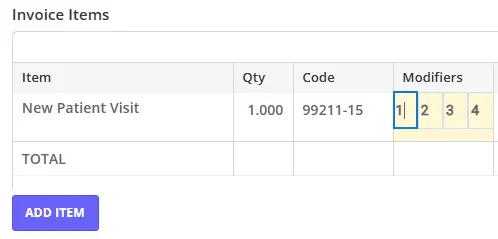
- In the invoice items grid, look for the “Modifiers” column.
- Enter or update the modifiers for each line item as needed.
- Click Save Invoice.
Setting Default Modifiers for Practitioners
If a specific practitioner always requires certain modifiers for their services, you can set defaults at the practitioner level.
- Go to User Menu > Account Settings > Team > Practitioners.
- Select the practitioner’s profile.
- Go to the Details tab.
- Find the “Claiming Code Modifiers” section.
- Enter the default codes.
- Click Save.
Modifiers on US Claim Forms
When you generate an insurance claim using Zanda and Ensora integration or create a CMS-1500 Claim Form from an invoice, the modifiers you entered will automatically populate in Box 24d, alongside the CPT/HCPCS code.
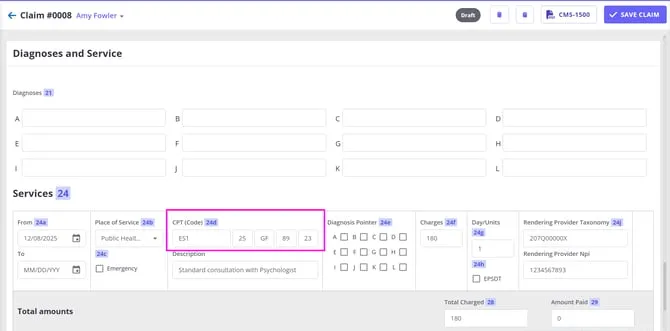
This ensures your claims are compliant and contain all necessary clinical context for reimbursement.
Frequently Asked Questions
Do modifiers appear on the client’s invoice PDF?
No, currently modifiers are only visible on the screen within Zanda and on the US Claim Form (CMS-1500). They are not included on the standard printable invoice PDF.
How many modifiers can I add?
You can add up to 4 modifiers per line item. Each modifier can be up to 2 alphanumeric characters long.