
Accessing the Status Page
- If you are inside your Zanda account, click on the Help menu (question icon at the top toolbar) and select System Status:
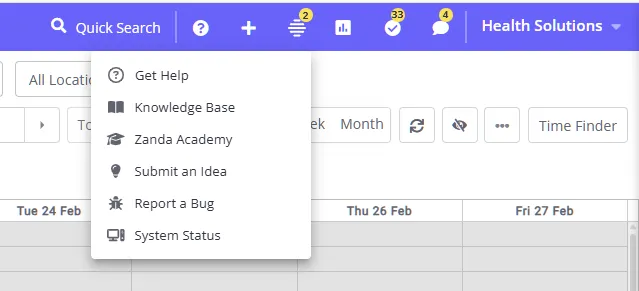
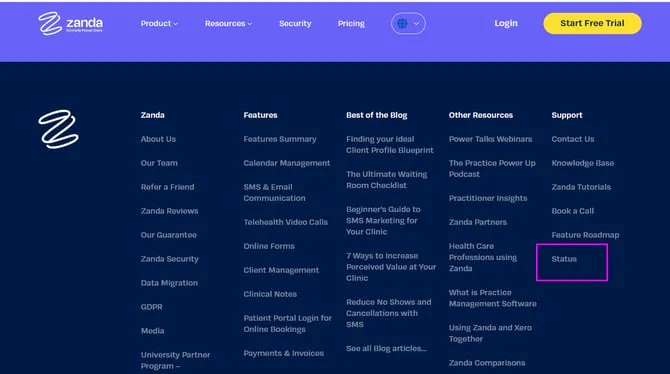
- Here is the direct link to the status page: status.zandahealth.com to view the Zanda system status page.
Reporting Issues
- If you encounter an issue not listed in recent notices, you can easily report it to our dedicated customer team.
Option 1: If you are in your Zanda account
- Click the Help menu (question icon at the top toolbar)
- Select ‘Report a Bug’
- Fill out the bug report form
Option 2: If you are on the status.zandahealth.com website page
-
Click the ‘Report an issue’ link at the top of the page.
-
You’ll be redirected to our support contact page, where you can detail the problem you’ve encountered and send it directly to our team.
We’d appreciate it if you included the below information in your message when reporting an issue:
- The browser type, version (i.e. Google Chrome Version 121.0.6167.189) and the platform you are using (i.e. Windows 11, or iPhone 14 version 17.3.1). If you are unsure, you can find this out by going here: https://www.whatsmybrowser.org/.
- The Zanda username you are logged in under.
- The steps you took to encounter the issue.
- The page the issue is present on - include the web address if possible (i.e. https://my.zandahealth.com/Report/ClientHistory).
- Any examples where the issue is present (provide details such as the client record number, the appointment date and time or the invoice number etc).
If you have some screenshots of the page where the issue is occurring (with client details hidden or edited out), please email them from your email service to [email protected]
Subscribing to Updates
Stay ahead of the curve by subscribing to notifications for Zanda system page updates.
-
Click on ‘Get updates’ and then the ‘Email’ option:
-
Then enter the email address where you want to receive any status updates:
-
Customize your notification preferences based on your region to avoid receiving unnecessary alerts:
Hint
Your login link will show you in which infrastructure your account is located:
https:// my.zandahealth.com/Account/Login is the AU/Global infrastructure
https:// us.zandahealth.com/Account/Login is the US infrastructure
https:// uk.zandahealth.com/Account/Login is the UK infrastructure
-
Once you’ve made your selection, click ’ Subscribe,’ and you’ll receive a confirmation message when your subscription is processed.
-
Final Confirmation: Open your email inbox and confirm your subscription to the Zanda System Status Page to ensure you receive timely updates.