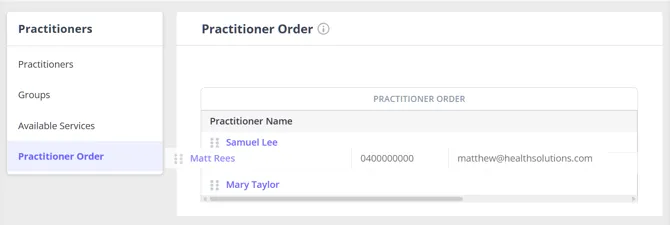
There is a feature in Zanda that allows you to reorder the list of practitioners to present them on the calendar display the way you need. The practitioners order that you set up will also be reflected in the order they appear on your Client Portal, including if you’ve added your Client Portal to your own website as a Book Now button, embedded booking widget, or text link. Since these all show the same Client Portal booking flow, the order is the same wherever clients book from.
To set the practitioners order,
- Navigate to User Menu > Account Settings > Team > Practitioners > Practitioner Order.
- Use the cursor to ‘grab’ the six dots in front of the practitioner name to drag and drop each practitioner in the right order.