
Why Use Zanda Academy?
Zanda Academy helps you:
-
Learn how to use Zanda efficiently—at your own pace.
-
Reduce training time for your team.
-
Discover best practices for managing appointments, clients, billing, telehealth, and more.
-
Stay confident and in control of your practice setup.
🎉 All courses are free and designed to suit both beginners and experienced users.
How to Sign Up
- Using SSO with your Zanda account login
- If you have a Zanda account, log in and go to Help menu > Zanda Academy.
- The system will automatically log you in the Zanda Academy and create a use profile with the same login getails as your Zanda account.
- Using the Zanda academy Sign Up form:
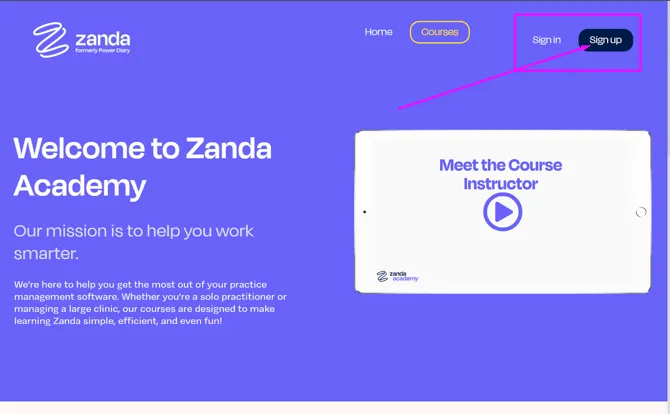
- Visit Zanda Academy.
- Click Sign Up in the top-right corner.
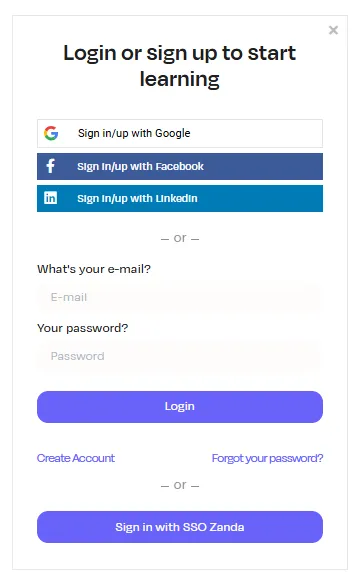
- You can register with your Google, Facebook or LinkedIn profile.
- Alternatively, enter your name, email, and create a password.
- You can also use the Zanda SSO login option
- Click ‘Start Your Learning Journey’ button to begin learning
How to Enroll in a Course
-
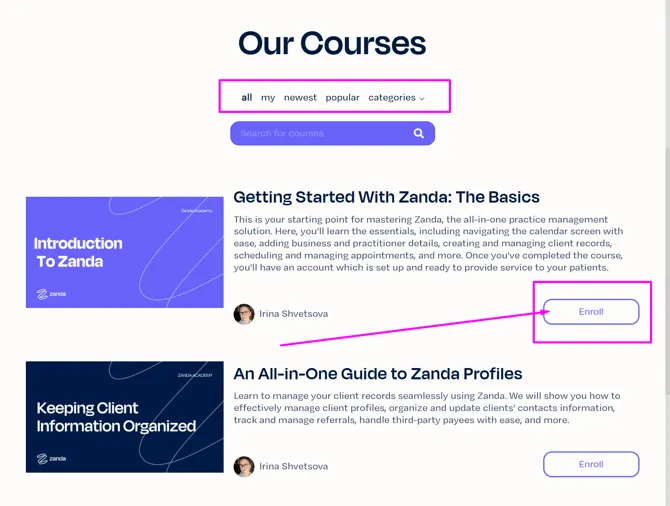
Once logged in, browse the available courses on the homepage.
-
Find a course that interests you and click the Enroll button to get started.
-
You can return to your enrolled courses anytime via your home menu.
Need Help?
❇️ If you ever need support while learning, our friendly team is just a click away at [email protected]
⚠️ Having trouble viewing or playing videos?
Some browser extensions—such as Reader Mode, ad blockers, or privacy tools —can interfere with how videos load or play on this page.
Try these quick troubleshooting steps:
-
Temporarily disable browser extensions, especially reader or content-blocking extensions, and refresh the page.
-
Open the page in an incognito/private window, which usually runs without extensions enabled.
-
Try a different browser (for example, Chrome, Edge, or Firefox) to rule out browser-specific issues.
-
Check your browser is up to date, as older versions may not support video playback correctly.