


Calendar Integrations for Efficient Practice Management
Track all of your business and personal appointments in one place.
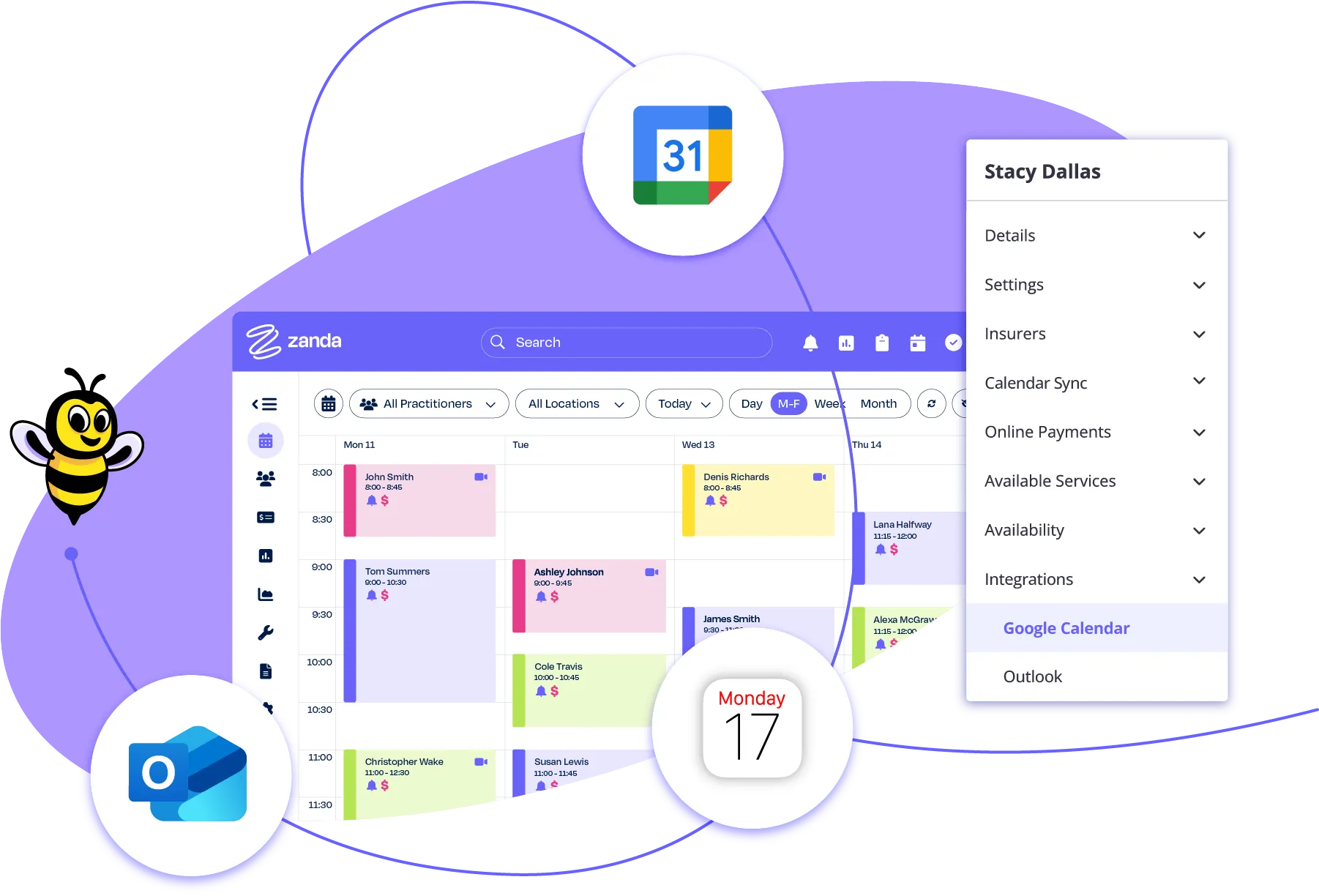
Connect your calendar seamlessly and securely
Google Calendar
Connect Zanda to Google Calendar for complete visibility of your schedule. Appointments update automatically with easy access across all your devices.
Outlook
Sync Zanda with Outlook Calendar to view every appointment at a glance. Share team calendars easily, keeping your day manageable and your practice connected.
Apple Calendar
Connect Zanda to Apple Calendar to see your entire day in one place. Your schedule stays synced across all your devices, so you can focus on your clients while we handle the updates
How calendar integrations save you time
Spend less time confirming availability and more time with clients. Calendar integrations reduce double-bookings and keep your schedule current.
Import your existing bookings
Bring your existing appointments into Zanda without manual entry. Bookings sync automatically, saving time and ensuring your schedule is accurate from the start.
Share your calendar securely
Control who sees your schedule. Share access securely, choose permission levels, and keep teams updated without constant reminders or back-and-forth communication.
Access your schedule across devices
Your schedule goes with you. Sync Zanda with Google, Outlook, or Apple and check appointments from your phone, laptop, or tablet. It’s easy to stay connected.
Client details are kept confidential
Balance efficient workflows and client information security with calendar integrations that only display essential appointment information, not full client records.
Don’t just take our word for it.
I love the online forms and the easy layout. When setting up new clients remotely, it has been so easy to send them the online consent forms etc. There's no printing or scanning required for the client, which I love.
It's working so well, we're expanding to two more locations across the university.
James Cook University (JCU) — student-led clinics
With ADHD it takes me a while to organize my thoughts. BizzyAI can put my thoughts together for me. I don't have to worry about writing the details and I can let the clients know they have my full attention. Provides a sense of relief.
Zanda' is very easy to use, maintain and extract reports you need for your analysis and calculations. I always have a history of patient's improvements, their activity and all financial reports periodically and by product or service. I recommend Zanda.
We love Zanda, it has reduced no-shows. Made invoicing, reporting and management of the administration tasks so much easier. I wish I had found it for our practice from the get-go!!!
Everything I need to run my business in one place making it easy to access client files, store information, run reports and keep on top of my accounting, wherever and whenever I need to.
Zanda enhances efficiency with AI notes, telehealth, and robust reporting. It supports smooth clinical operations, easy communication, and data-driven insights. I love its innovative approach and strong support, making it indispensable for our practice.
Easy to set up, I liked the forms templates which I customised to suit my private practice. I was able to create an automatic response, and a new client intake form is sent out automatically when a new client books. Plus it has an integrated payment system. So far I'm impressed with the intuitive way that it is set up. The help info online and customer support has exceeded my expectations so far.
Zanda is I believe the best practice management software on the market. Also they are constantly looking to improve the service with new features and safe AI integration. Recommended!
Provides clear notes that cuts through a lot of the irrelevant information provided by the patient.
SMS reminders are essential. Most patients confirm right back and I can customise the timing per patient. Some need a 3-day or 6-day nudge, not just the standard day-before.
Acupuncturist
I like the fact that Zanda supports every aspect of my business: appointments, invoices, video calls, client booking portal, etc. It has reduced my admin hours and has reduced my time on appointment bookings, as people can book their own time slots. The introduction of AI has also made a significant difference when it comes to writing client notes.
BizzyAI can help elevate your notes and save you time.
Zanda is the only system I evaluated across Australia that's advanced enough for student-led clinics. Letting students draft notes and routing them to supervisors for review inside the system is something other practice management softwares just don't have.
James Cook University (JCU) — student-led clinics
We have found Zanda to be an awesome addition to running our practice efficiently. From the easy to use interface to all the features you need to keep on top of invoicing and client appointments. There are always great updates to the features offered and the Zanda team are always open to suggestions for improvements.
I'm building the ship while it's in the water. Zanda just runs really smoothly it makes the practice easy to run from day one.
Solo private practice
When I was comparing platforms, I was blown away by how affordable and accessible Zanda was. Other platforms wanted to charge a ton. That made it very easy for me to get started.
Counselor
My Virtual Assistant business works with psychotherapists, counsellors and psychologists in private practice and we always recommend Zanda to them when they are looking to upgrade their systems to an EHR. The fact that invoices can be customised to allow easy medical insurance invoicing is great and a real time saver.
I wanted a system that could hold everything you do in a practice so I wasn't jumping between different softwares to do different things.
Solo private practice
Once I'd put the work in to tailor it to my mobile dental practice, it became indispensable. I rely on it for everything.
Dental on Wheels
After years of typing notes through every session, my wrists were hurting and the screen time was wrecking my eyes. With Bizzy AI, I can cover the screen and just talk with my client. That's how therapy is meant to be
Psychologist
Zanda has played an essential role in evolving our service. We found it an easy system for the whole team to learn to use. We are a small charity and Zanda has streamlined our processes and saves us huge amounts of admin time. It gives us everything we need to organise our services and client data, and is easy to use for those less confident with tech systems.
Has made life as a solo practitioner so much easier! Enabling clients to schedule their own appointments and having control over the time frames for booking and cancellation. Very simple platform. Can also use for my own appointments and set reminders.
Great features, also the resources in the practice manual made it easy for me to set up my business.
I love the clinical notes feature and how easily I can upload supporting documents to every case. I love that it can send digital forms and has a patient portal. I am able to keep all documents relating to each patient together more easily. I also love that I can add clinical notes on the go on mobile, save them as a draft and complete them later.
Zanda isn't just integrated it's seamless. You can process an invoice and book the next appointment on the same screen. Adding Bizzy AI on top of that was a huge win.
Chiropractor
Zanda makes my business run smoothly and reduces my admin time to an extremely manageable amount. It is user-friendly and intuitive to use. Once all your tools, forms and letters are as you want them, client file management & communication with other professionals is merely a couple of clicks. My case load is now higher as my admin time is so low.
It allows me to solely focus on my client, leading to better connections and client outcomes. I have a peace of mind that things we talk about are being captured perfectly allowing me to place my focus solely in my therapeutic work. BizzyAI is by far the best AI program out there. I've never had my client sessions captured so perfectly.
Since I have started using Zanda, my practice runs so much smoother, far less no shows with email and text reminders. Also, a much easier way to keep track of unpaid invoices.
Zanda is great for counsellors - it has an easy-to-use platform. It's so easy to navigate and set things up to integrate with my website. Billing and tracking payments is also super easy.
Organization is helpful, invoicing is awesome, super easy. Love the online forms and automatic import to file - one less thing I have to do! I love how files and info is stored and how my calendar looks.
This is the easiest, most user-friendly booking platform. I can't believe that it has everything I need to run my practice and is so easy to use.
I love most everything about Zanda. Super easy to use and has made our client management more efficient.
Zanda is so easy to use. It gives me peace of mind in my private practice as a counsellor as it's very professional and keeps notes safe. The app is super helpful too when you are on the go and you need to check your appointment diary or quickly respond to a client.
Zanda saved me 15% of my time right away, no more toggling different systems. Everythings in one place, and its easy to access between visits.
By reducing the admin load attached to each consult, Ive been able to grow my caseload without extending my hours or sacrificing energy. Because of BizzyAI, Ive genuinely noticed an improvement in the number of clients Im seeing week to week around 10–20% more on an average day.
Chiropractor
It streamlines my whole practice. From booking sessions, invoicing, sending online forms to clients and note taking. It makes everything look very professional compared with my competitors.
Invoices, automations for email sending, forms, appointment reminders, even a Practice Manual with policies that you can amend to suit your clinic.
Conversations with my clients can run half an hour on really heavy stuff. Before Bizzy AI, I had to balance staying present with frantically taking notes. Now I can just sit with them, the documentation is taken care of.
Chiropractor
Zanda gave me a fully usable account for about a month to play with. I could immediately see how easy it was calendaring, customer info, templates, everything seamlessly integrated.
Acupuncturist
The generation of personal Tax Invoices and receipts allows me to individualise these invoices and to create third party payments from care services such as NDIS payments. Being able to create monthly sales reports for tax return is a huge time saver.
It is solving the time problem. All the important functions are automated and we can customise different functions and templates to our needs.
Zanda actually listens to its customers. New features keep arriving.
James Cook University (JCU) — student-led clinics
I love the way we can integrate the practice manual. Also, the AI is great.
Lots of automations that make admin easy. Lots of developments over time that continue to improve the software. Lots of engagement with users to figure out what people want and need out of the software.
My clients are now able to use the Client Portal to make, amend and delete their appointments, depending on my cancellation policy. I have almost no 'No Shows' due to the automatically generated email reminders. My clients are more self sufficient by timing their appointments themselves and not feeling pressured for example straight after the session to arrange the next one.
I don't feel like just a number with Zanda. I feel like I've got a team.
Solo private practice
I have been using Zanda for 18 months now to run my massage and personal training businesses. I use it to keep client records and keeping my diary. The app is easy to use and has helped me progress my business to the next level.
My retention has improved because clients feel heard and they know they've been heard, because it's their own words being reflected back to them in their second visit.
Chiropractor
I love the AI notes feature, which significantly saves me time by allowing voice input and providing comprehensive clinical notes with detailed muscle group information.
BizzyAI is your best and most reliable work. We are very happy with BizzyAI.
A client emailed last-minute asking to switch to virtual. It was just so simple click a couple of buttons and the link was sent. There's so much freedom in that.
Solo private practice
Easier to keep track of everything as each client has an account, which you can use for SMS/email reminders, booking in, payments, templates to save time, etc.
The SOAP notes setup is excellent, and the fact that these can be delivered online without any hassle makes it more convenient for myself and my clients. I also appreciate the space for files to be stored for each client. When I was looking around for booking systems, this one definitely stood out. Overall, Glad I went with it, and would recommend it.
One major component you'll need in private practice is a HIPAA compliant EHR that is easy to use. I love using Zanda because I've been able to automate a lot of simple tasks. For example, when someone schedules their very first appointment, they automatically get an email w/ links to complete the intake forms specific to them. Automating as much as you can saves so much time & just makes me happy thinking about it.
The Zanda team is friendly and available they jump on the case, they don't give up, they work through the challenges with you.
Psychologist
It has streamlined appointment management, reducing admin time and human error. The online practice manual ensures staff have quick access to policies and resources, supporting quality and consistency.
Mental Health Care
Zanda templates are awesome too! They have a vast library of templates that you can use or edit to make your own. You can also start from scratch and create your own templates for client notes, email automation, and forms. I am very pleased that when a client registers for the client portal, they will receive an automatic email with the client forms they need to complete prior to their appointment with me.
Less note-taking while talking, so can focus more on the client.
It's given me back a life, I've gained at least 2 hrs a day. I'm able to be present with the client for the whole session rather than trying to store in my brain things that I wanted to remember for my notes. I don't have that problem now. Within a few minutes of a client leaving the office the notes are completed. I can now leave work at work and not bring it home.
BizzyAI provides clear and succinct patient notes and does it in real-time so I don't have to go back and recollect information post sessions.
With the other practice software, it's like the wild wild west things just go wrong all the time. Zanda's just more reliable and it's so easy to navigate.
Psychologist
All the stuff I thought I'd need an entire team to do is actually a lot more manageable as one person. That was pretty surprising.
Counselor
Zanda is an excellent resource to have. It is very efficient for scheduling appointments, and it makes writing notes as easy as can be. Zanda makes billing and invoicing seamless. The automated appointment reminders are an excellent tool that Zanda incorporates. Overall, Zanda is a reliable and easy resource that I highly recommend and will continue to use in daily practice.
Everything is accessible from the diary functionality. We are an NDIS-funded service and it provides a user-friendly resource for managing invoices and record keeping.
So far, so good. The site is user friendly and the set up instructions are clear to follow as they are broken down into step by step instructions. At present, I am liking their automation options as it helps to save time. Hoping more automation options become available.
One clinic told me Zanda saved them up to an hour-plus per day. That's the difference between students writing notes and students actually building clinical skills.
James Cook University (JCU) — student-led clinics
I came from a practice with admin staff who handled the billing, scheduling, and emails. When I started on my own, I didn't fully know what I was getting into Zanda met all of those needs.
Counselor
I rely heavily on the calendar. Colour-coded statuses let me see at a glance who's on insurance, who has a discount, who hasn't confirmed yet. One look and I know what's what.
Acupuncturist
I used to pay for a Zoom account. Once I saw telehealth was already covered in Zanda, I closed out my Zoom subscription. One less monthly bill.
Counselor
I was able to quickly learn Zanda. The scheduling and invoicing are simple, and it is easy to track payments as well. It does everything I need it to do for my business!
"95% of my notes are now done inside the session window. That's a huge amount of time I used to spend catching up on weekends and evenings.
Psychologist
Before automations, I was on the phone every afternoon after a visit, manually texting reminders one number at a time. Now my templates and automations do all of that and it's freed me up to actually grow the business.
Dental on Wheels
Before Zanda, we had Excel spreadsheets and Word docs on a shared drive. Clients were waiting on the list for 2 years with no updates. Now every SMS, every email, every note is in one place automatically.
James Cook University (JCU) — student-led clinics
I am a psychologist and have been using Zanda for 6+ years and have found it easy to use and have particularly liked how the program has continued to develop with new features being added regularly. As a sole practitioner with no admin support I really value all of the automation in the program that reduces my admin time.
It was surprisingly easy and surprisingly quite seamless… especially because the way that I do work is probably more of a niche within the chiropractic field.
Chiropractor
I use the booking in via my website (client portal and calendar) which works really well, also find Zanda easy to set up bookings and payments for online workshops. I could probably go back and live without Zanda, to be honest, but life WITH Zanda is much better!
Using Zanda as my booking system, means I'm not spending all my time on the phone taking bookings, and it means I can focus my time and energy on making sure my client notes are specific and up to date. The payment system is also super convenient.
The interface is really user-friendly, it has great features that are needed for Private Practice and great customer support. I especially love the client profile section and the fact that it's easily adaptable to any client base (such as minors and couples!). You can add contacts to get appointment reminders as well as the client themselves and you can add an emergency contact.
I use Zanda for my home-based Remedial Massage therapy business. It has been a total game changer in helping me with SOAP notes for my clients. The templates are easy to use and to tweak to meet my needs. Zanda has made a tedious (but necessary) task so easy and totally changed the downtime I need to write my notes.
I would definitely encourage them to try BizzyAI because it saves time and stress, improves accuracy and engagement and presence with the client.
I like the notes feature, which is why I was interested in the first place, but being able to send forms and clients having the option to use the client portal is a great tool. No shows have stopped, the text reminder gives them the option to confirm or cancel. I don't need to carry a bunch of heavy paper notes with me all the time now.
I went from working 3–4 days a week in the clinic and running my business on the side, to running my business full-time. I don't think I could have scaled without Zanda and my business coach.
Dental on Wheels
I love Zanda! It's so convenient and easy for my clients! They get reminders and making notes is so easy with so many templates to choose from.
Zanda has allowed me to arrange bookings easily alongside my other job. It allows me to personalise client records so I have all the information that I need. I know everything is safe and secure with the system and I can generate invoices, emails and text messages easily.
Previously it was very time consuming, and I often struggled to find time in between patients to write notes. Now it is much faster and also very thorough.
Zanda effectively consolidates all practice management elements into one platform, which streamlines my operations. Additionally, Zanda provides a practice manual feature that allows us to upload and access policies and procedures for our practitioners at any time, which is invaluable for maintaining consistent standards and accessibility.
Before deciding on Zanda, I had tried many different systems and they just didn't give me everything I needed. My clients can book online, choose to pay before the appointment with the Stripe facility, and telehealth. I can email all my invoices easily. Easy to look up unpaid accounts and see future bookings and potential income.
It's easy to keep track of a lot of different letters or reports that are sent, and also reports that have come in.
Psychologist
I cut my note-taking from 15 minutes to 5 minutes flat. Cutting my note-taking time by a third is great especially when I think about the caseload I want to hold long-term.
Solo private practice
There's not a single health provider out there who got into practice because they wanted to write notes. We went into this work to help people. Bizzy AI takes that burden off our shoulders so we can actually do what we came here to do.
Chiropractor
Zanda keeps growing and improving. It's meeting what we need in these times.
Psychologist
I use Zanda for my private practice as a therapist with diary management, record keeping, telehealth calls, and invoicing, and have been doing so for a couple of years. It is a straightforward system to use for invoicing, and this helps me keep on top of the financial aspects of my work.
Zanda is the first thing I look at when I wake up and the last thing at night. I'm normally avoidant about work stuff but Zanda actually feels inviting to log into.
Counselor
I like the way it just keeps improving and how easy it is to obtain help if you get stuck doing something. I find it easy to use and I can add information easily to my customer files in the software.
Using the AI has made it so much simpler and I find I no longer avoid note taking. This means less stress as at the end of the day all my notes are done and I can let go of work and relax and be with my family.
Life changing. [Describing BizzyAI in one sentence to a colleague]
Patients describe issues all over the place digestive, then sleep, then a headache, then back to sleep. Bizzy AI takes that conversation and organizes it: digestion in one spot, sleep in another. It's really easy to review.
Acupuncturist
Zanda is more flexible than your other dental softwares especially for mobile.
Dental on Wheels
I am so glad that I switched from a previous, less effective software to Zanda. Despite not being a software guru, I could get used to many helpful features on Zanda to reduce the administrative work to a minimum. The Online Booking and Forms features are so practical that give clients the freedom to book and submit information themselves. No more time-consuming back-and-forth emails.
I use this app for work, I am a foot care practitioner in a clinic. Great way to keep track of appointments & client records. I highly recommend Zanda!!!
Over the past year Zanda has proven a great tool for managing my counselling practice. I love its Zoom integration. I've greatly benefited from their private and secure AI note-taking tools to remove friction and help overcome my perfectionism with client note-taking. Their customer service has also been excellent.
Every time I review a Bizzy AI note, I'm so impressed. I'm like, wow that is exactly what I needed to document.
Solo private practice
Moving to Zanda and having the templates and automations set up freed me to do calls, social media, and other things which I would normally have to stay up until 1 or 2 in the morning to do.
Dental on Wheels
I love that Bizzy AI is HIPAA compliant. It doesn't get creative or make things up it transcribes the actual conversation, in the order I want, using my patient's own words.
Acupuncturist
Our clinicians found that the biggest challenge was the time that the session notes took, if done after the session, and the accuracy of the notes since they were based on memory. Now, with BizzyAI, the entire session is noted in the transcript and transformed in seconds into a note, saving a lot of time and making the notes much more comprehensive.
I was using paper files for years. They were getting out of hand I couldn't keep adding more filing cabinets to my collection. Going paperless with Zanda gave me back about an hour a day.
Psychologist
Zanda has all the features I need to run my private practice. I was even able to link my website to the client portal with ease, so my clients can manage their existing appointments online. This feature, among other really helpful features, significantly reduces my administration time, particularly when new clients book.
Zanda met 99.9% of our cybersecurity tests top-notch out of every system we evaluated.
James Cook University (JCU) — student-led clinics
It's so easy to navigate. If I need to spend 5 minutes to pull up a new letter to write to a doctor, you can do that really quickly.
Psychologist
Zanda integrates seamlessly with…





The practice management software loved worldwide
Finish work earlier with an all-in-one practice management system.
Ease of use
Customer service
Value for money